

Advance Delivery Schedule
- 3
Highlight Features
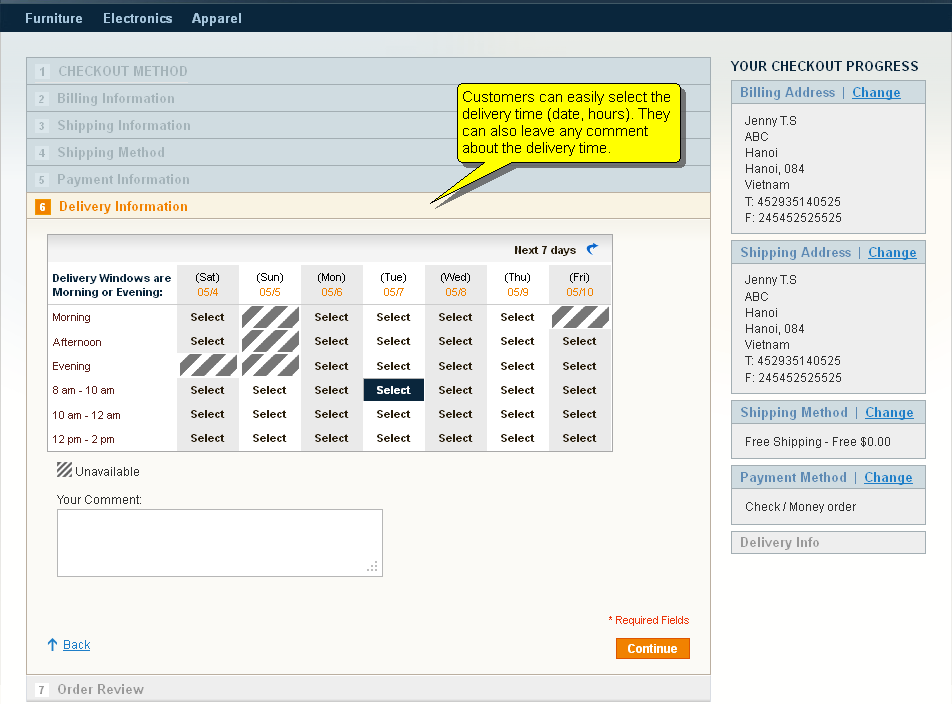
1Allow Customers Comments
Avoid confusion with clear directions
2Nice Frontend Design
Customize titles and directions
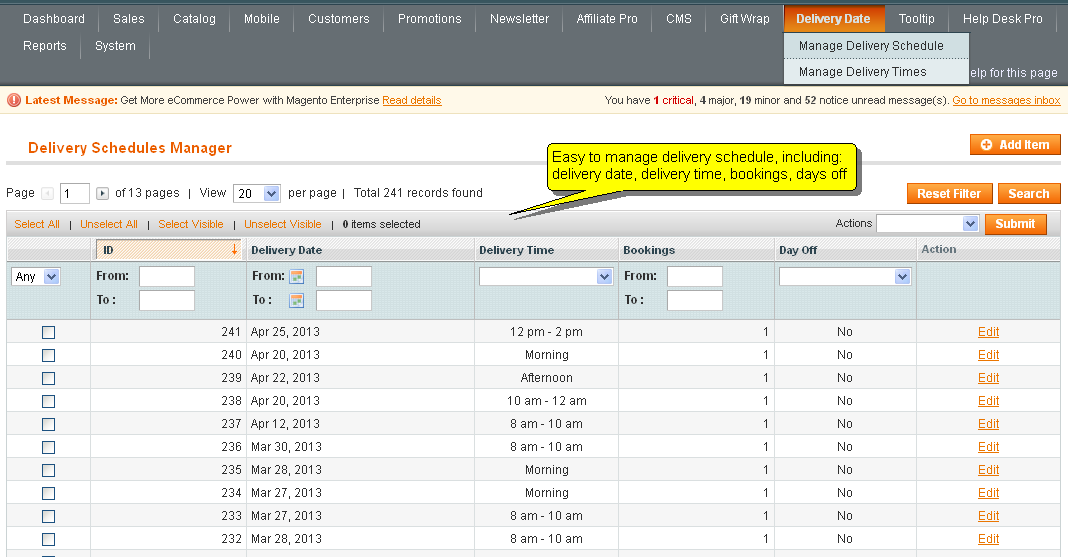
3Set maximum # of appointments per period
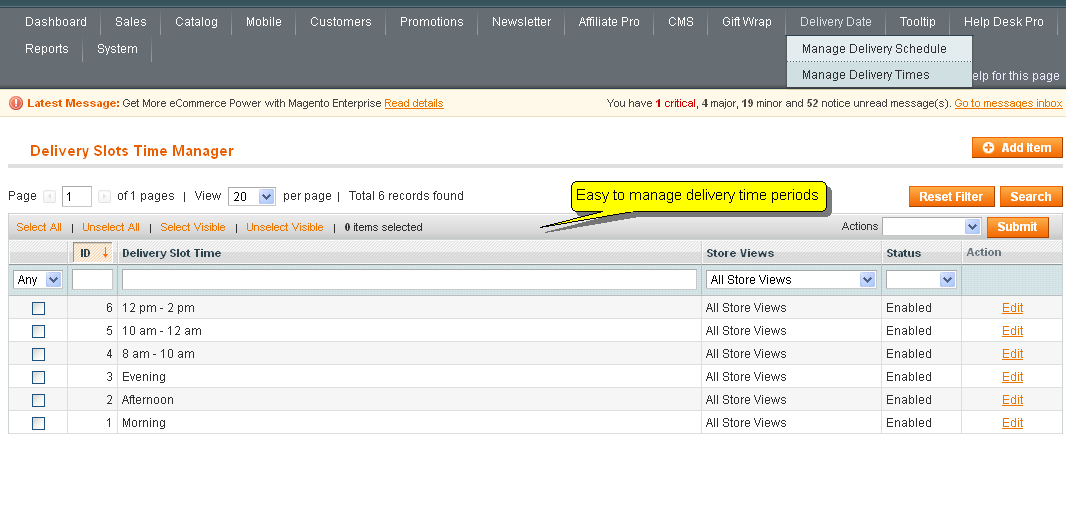
Set time available and time off easily
4Add Delivery Time to Confirmation Email
Allow admin to set delay time to deliveries. Ex. 24 hours after order
Feature Full-List
Highlighted Features
- Nice frontend design
- Add more one step (delivery information) to the checkout process
- Add delivery information to the confirmation e-mail
- Allow admin to manage their delivery schedules
- Allow customer to select the Delivery Time Slot.
- Manage Delivery Time Slots in the Store View
- Allow admin to maximize the number of bookings/deliveries on each time slot
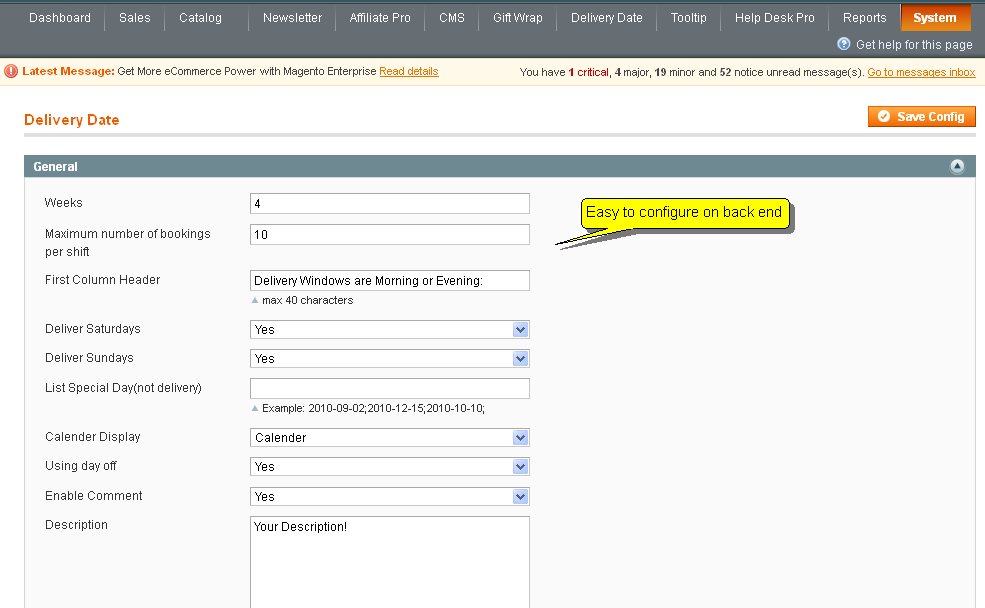
- Admin to allow deliveries on Saturday or Sunday
- Allow admin to select Special Days for no deliveries.
- Allow admin to display "Calendar" or "Date/time Picker" in Delivery Information Step.
- Allow admin to set delay time for delivery (Ex: Customer can only select a delivery time slot after the next 24 hours)
- Allow admin to display Delivery comment on frontend
- Allow customer to write a comment with the delivery step
Other Features
- HTML/CSS validation
- Easy to install, easy to upgrade, just copy and use
- Friendly and flexible configuration
- Supports multiple stores and multiple languages
- Easy to customize front-end via HTML/CSS
- 100% open-source
Documentation
Why should we choose MageWorld
Free
Life-Time Upgrade
Free
Life-Time Support
90 Days
Money Back
100%
Open Source
98% Customers
Satisfied
11 years
On The Market
Testimonials
Your satisfaction is our most value motivation
Mage-World's Magento 2 extensions are very impressive, they are all easy to install and use. I haven't experienced any difficulties when using these products. I highly recommend this site! I think I will sponsor this company to my friends in the future.

Ashley Rulin, Sales Manager
The support service is really good, you're always there when I have problems. I have worked with several services but you are the one that is able to satisfy my expectation. I will continue working with your service in the future! Keep the good work.
David Bleu, CEO
I'm really impressed with the Magento 2 Affiliate Pro module from Mage-world. It's simple, but powerful, and it can entirely replace my previous costly affiliate system without any difficulty. It's a valuable catch for anyone who wants to have an built-in affiliate system for your Magento site. Besides, the support is superb and affordable.
Steve Marshall
Customers reviews
-
Mageworld has a great support team who can help you with what you needHardikI have purchased this extension and need customization as per my requirement. They have help me out with all the customization needed and now my site is working perfecty as i wanted. Thanks to their team for such great support. Had a new friend name "Le Van Huong" a supporter from their team who was ready to help me working overtime. Thank you bro. Go for this extension its great and their team is their to support you if had any problem. :-)
-
Best Price + Best Support + Best QualityRamaI really suggest MageWorld for their support and the way they respond, Will always love to go for more extensions. :-)
-
Fantastic for enriching customer's shopping experienceZokrathThis extension is extremely useful for companies to adopt a more friendly shopping experience for online customers by allowing a customised delivery time! Can be further improved by enabling/disabling for multiple shipping methods.
-
Cool oneIbeer - Still under developmentReally one of the best plugin to have, Helpful support team.
-
extension works perfect, needs some small issues to be addressedSergio - pistoteca.com"Pros: Excellent priced, full featured extension very very flaxible and most likely what you are looking for, very good support.
Cons: Have to install additional licensing software in your server to keep it running, have a couple little issues but they can be fixed by oneself, there is no documentation provided, you'll have to learn to use is on your own
REVIEW:
You need to manage your deliveries in real time, and your company is running in Magento, well, you are in luck, from googling "schedule deliveries in Magento" to purchasing and downloading you're good to go, "Advance Delivery Schedule" by Mage World is the software you are looking for. Price is only USD $89.99 (sans installation) and this is a very powerful and complete extension.
In my personal experience, installation did not work for me, if you have USD $10 to spare, i'd recommend adding installation for software, If you dont, worry no more and keep reading. Alright, you have purchased this extension and downloaded it, so what's next? open readme file for further information on installation, you follow each step according to documentation but your Magento store is DEAD! Why?!?! what documentation doesn't tell you is that after uploading files to server, you need to download another package from Mage World site and upload it to your server, this package is a license activator (yes, extension requires additional licensing software to be uploaded to server in order to work properly) fine, you uoload additional licensing software to server and you are good to go!
What to do next? well, let me tell you its a little tricky, some admin options are not clear and it happens to be time to perform some trial and error to learn exactly what each option does...or you can read the documentation...little did I now, there is no documentation provided with extension, this could pose a real issue to someone looking to install it and expecting to work perfectly out of the box on a live site.
So you have already familiarized with most settings, maybe, you have noted Delivery Time page dont display properly (this is in personal experience, maybe its an issue relative to my Magento version, theme and/or server) but no biggie, anyone with basic html knowedge can correct those little issues in css file, now calendar looks perfect
Site is running, you have already familiarized with most settings and corrected little css rules , site looks wonderful, but wait...whats that? Looks like there is a line in Magento's source that is keeping system timezone in UTC, unless you change that line you wont be able to have your time in sync with your extension.
Alright, site is running, you have familiarized with most settings, corrected little css rules and edited line in Magento's source, now extension its looking wonderful and time is in sync with local time, customers can select a delivery time, and you can even select how many customers can select the same delivery time, times in past are set as unavailable and current day is shown in first column with available slots ready to be selected, extension works like a charm and keeps business running smoothy." -
When you need them, they will be there!Jairo - www.loqsea.comWe all now that in the extension world it is more likely that you will find something that should´t go they way it did: the digital world is definitely not a perfect world. My experience with the Mage-World, was beyond satisfactory since they always looked ways to not only solve the issues, but also to make sure that I was 100% happy. The extension it's easy to use and does everything that is suppose to do.
No need to say that I will definitely recommend to give it a try. You have nothing to loose: when you need them they will be there! -
Amazing extension and supportAnthony in London, UK - BTInternet.comThis extension is very powerful and feature-rich, but the technical support surpassed all my expectations.
Thank you Mage World team for your rapid response in helping me configure this to work with another Magento extension.
As my online business grows, I will no doubt be purchasing again from here very soon. -
Extremely Good Price For Powerful ExtensionL_AusWe run a local shop and wanted to extend our reach by going online. The problem is Magento seems to be focussed on purely online store setups and thats where Advance Delivery Schedule came to the rescue. We now have an online store with extremely granular control over when we will deliver our orders. This extension is really awesome.
-
Best Delivery Extension for the Best Price.DanielBought this extension yesterday and with the help of customer support, was able to install it and it runs smoothly with no problems. Awesome UI, easy to use, and provides everything we need to schedule delivery times and dates.
-
great supportseahawkThe support was great. I got a few things to fix and they helped me to fix it. Thanks MageWorld.
-
PerfectMa_24i purchased this addon and it conflicted with another extension(from another company) on my site.
I asked MageWorld for help and they fixed it completely.
This is what i call GREAT support !
Extension does exactly what i want.. as i personally deliver stuff to customers in my town, this extension was a must.
I couldn't run my shop without it :)
THANKS AGAIN MAGEWORLD! -
APIjaumepcworks fine, and have a nice look. but i miss the fields export by magento api. wirh "sales_order.info". tks